Welcome
Your Lomi source package
The ZIP opens into three top-level folders. Begin with documentation/index.html; it works without a connection. The app folder is an Android Studio project. The server folder contains the Go API, Nuxt admin console, Docker setup and detailed developer references.
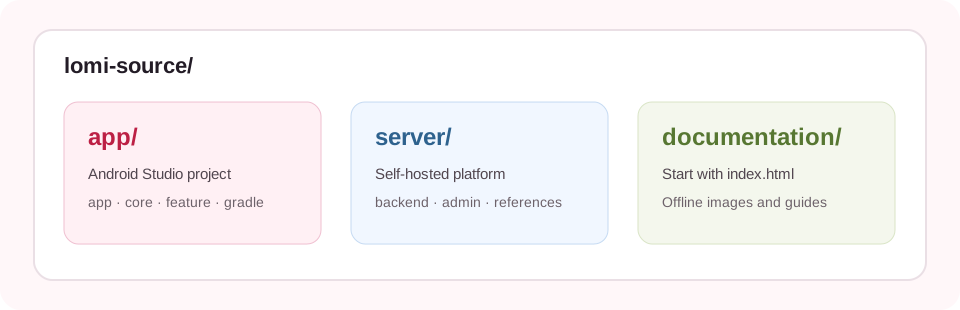
Choose your path
Recommended order
Unzip the package
Extract all three folders to one location on your computer. Keep the names and relative locations. Do not open the ZIP directly in Android Studio.
Start the local server
Follow the server guide. Confirm its health URL responds before you connect the Android app.
Prepare and build the app
Follow the app guide. You will supply your own private signing key and Firebase configuration files.
Plan a public launch
Use HTTPS, a domain, backups, production credentials and a verified release build. Complete these deployment steps before making your installation public.
Read before installing
Buyer setup requirements
The admin wizard needs an activation key. Paid buyers can issue one local development key and one production key from the checkout after copying the installation ID shown by the wizard. Use the included feature documentation to identify connected and local implementations before configuring your deployment.
- Android source includes connected email/password, profiles, publishing, feeds and messaging paths; consult the feature documentation for implementation details.
- The Docker script starts a local API, worker, PostgreSQL and admin console. It does not configure a public domain, HTTPS or backups.
- Seller signing keys, server credentials and Firebase configuration are excluded. You must provide your own.
- Detailed implementation notes live in
server/docs/; the Go and Nuxt source each include a README.
Need help?
For an order or package problem, email lomi@amixmon.com with your order ID, a short description and the exact error text. Never email passwords, private keys, wallet recovery phrases or your server .env file.